When designing an Oracle Cloud Infrastructure (OCI) tenancy, the first step to building the foundation is locking in the compartment design. Compartments are part of the Identity and Access Management (IAM) construct within OCI. IAM consists of users, groups, policies, and compartments. Client familiar with AWS, Azure, GCP, etc. but new to OCI often try to think of compartments in the terms they are familiar with from the other CSP’s. That is where confusion can start to creep into the design process. As an example, I once had a client that equated OCI compartments to Azure subscriptions. So, during the design process for OCI, the client wanted to match OCI compartments to the number of Azure subscriptions.
I think it is important for customers new to OCI to understand the difference between OCI tenancy and compartments. The tenancy is where customers subscribe to the desired OCI regions, it is also where the OCI defined service limits for the types and consumable number of OCI resources is defined. On OCI, customers do not need multiple tenancies as they can subscribe to any or all OCI regions from a single tenancy and in most cases, the service limits can be increased as additional consumption is required. There are limited cases where multiple tenancy designs could be warranted and utilization of OCI Organization Management is what allows customers to manage a multi-tenancy. Possible examples where multiple tenancies may be required could include acquisition or merger of a company with an existing OCI tenancy, the rare occasion a hard service limit is reached (there will be a future blog post on this scenario), customers that do not want to have a single pane of glass for OCI billing but would rather have mission groups or lines of business manage billing for their own tenancies.
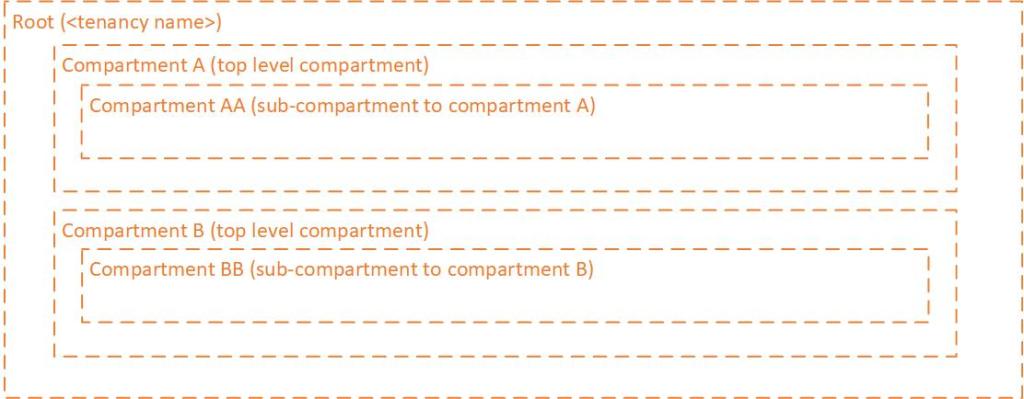
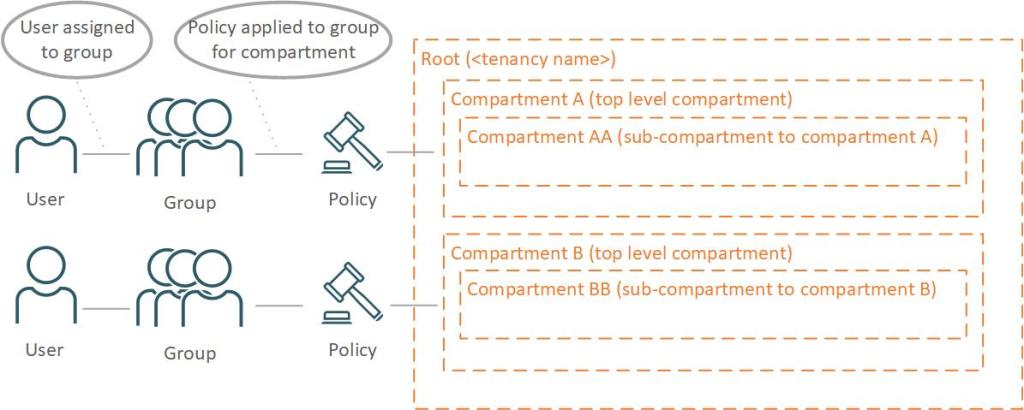
So now that we understand the tenancy construct, what is the difference between a tenancy and the compartments defined within the tenancy? Compartment definitions allow us to control what OCI resources are deployed within them and who has access to deploy and manage the resources deployed within them. We can control what resources are allowed to be deployed by using compartment quotas. If a mission group or line of business has a set monthly budget, defining compartment quotas will ensure that the budget is enforced. We control access to the compartments via groups and policies.
OCI policies define what level of access a group has within the compartment. For example, a group that is assigned the ability to manage all-resources would have full access to deploy, update and terminate any type of OCI resource within the compartment. Typically defined as a compartment admin. If we need segmentation by role, then we can define separate policy by different groups. As an example, we could define a policy for the group network admins, to manage the software defined networks and we could define another policy for a compute admins group that would be allowed to manage compute and block volumes.
When designing the compartment structure within a tenancy there are some key considerations to keep in mind:
- Global – Defined compartments are available in all subscribed regions. If we define the compartment Network in the Ashburn region to deploy and manage software defined networks, the compartment Network can be used in Phoenix, Frankfurt, etc. to manage the software defined networks for those regions. Once a user selects a region, they will only see the resources for that region when exploring the compartment.
- Operational Error – Where are the use cases where segmenting the compartment into a sub-compartment or another top-level compartment warranted? Continuing with the Network compartment example, if there is a production network and a non-production network it may warrant separating the compartments for prod and non-prod to prevent the potential for human error (i.e., thought a change was being made to non-prod sdn but change is made to prod sdn).
- Operational Overhead – The default limit to the number of compartments in a tenancy is 1000. If you add sub-compartments to the mix, the operational cost to maintaining the tenancy begins to increase exponentially. Governance tasks to review the tenancy become slower as the compartment structure must be “walked” in each subscribed region. If admins are using the UI, navigating between compartments can become tedious and lead to a human error (i.e., thought they navigated to the target compartment but did not).
- Standardization – Applying cloud standards across CSP’s wherever possible (i.e., naming conventions, how resources are deployed, which groups are responsible for what operational activities within the CSP’s, etc.)
Keeping in mind the purpose of the compartments (who and what can be deployed) along with the key considerations listed above, designing an OCI tenancy compartment structure becomes something of an art. No two customer tenancies will be exactly alike, but the goal is to commit to a design that allows for future expansion or use cases, adhere to existing cloud standards and reduce the risk of operation error as we operation overhead. In part two we will start looking at the evolution of the compartment designs and access with a focus on OCI network deployment and access.
 Cloud Architecture Blog
One response to “OCI Compartments Guide part 1 of 4”
Wow. This is exactly what I was looking for.
When building out your organization’s tenancy using both compartments to segment environments (like Robby describes) and utilizing tags to identify systems proper design will help clean up sprawl and better mange any charge back strategies.
LikeLike