If a VCN is deployed within the same compartment, there was no way to specify, via policy, access control to a specific VCN or subnet. As an example, if a Production VCN and Non-Production VCN were deployed in the same compartment, compartment policy was too broad. Even with two different IAM groups, both groups would still have access to Prod and Non-Prod VCN’s since the VCN are in the same compartment. Thus, the VCN had to be segmented by compartment. That either meant more compartments dedicated to VCN’s or deploying a VCN for each project or line of business.
In the example below, if the client wanted to segment network control from the project compartments, a potential compartment design would look like the following:
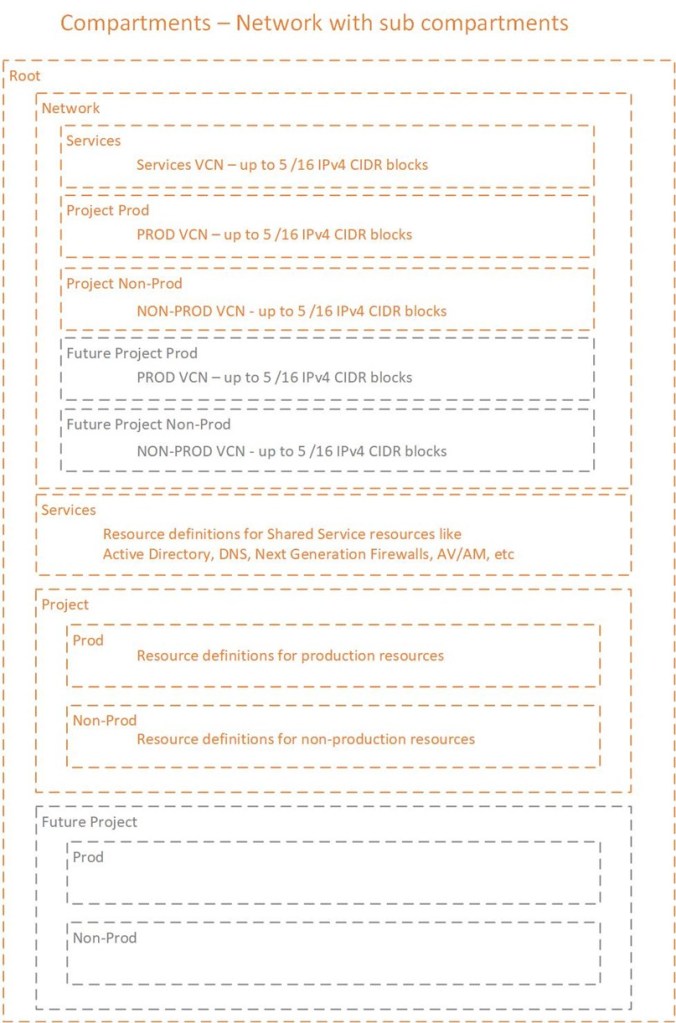
This design increased the number of compartments but accomplished two key elements:
- Ensure only network administrator’s had access to manage the networks – assign a policy to the network admin group to allow management of network at the network compartment level which would allow the network admin group to manage the networks in all of the sub-compartments under the parent Network compartment
- Provided a method to allow project groups to use the correct VCN – policies would be assigned to defined project groups to use the networks by adding a where clause that restricted the access to the network by sub-compartment (i.e. non-prod group for Project is granted use of network where compartment = Network:Project Non-Prod).
The trade-off, was added complexity to the network management. The network team would have to segment the CIDR ranges and still had the complexity of either navigating to the correct project compartment or ensuring the automation pipeline was pointing to the correct compartment to manage the VCN’s.
NOTE: I would like to note that for anyone considering putting VCN into one compartment and the subnet definitions into a separate compartment do NOT do that! The OCI API code for network looks for a VCN in a compartment and once the VCN is discovered will do the search for subnets. If the VCN definition and subnet definition reside in separate compartments, automation using CLI, SDK, terraform will be severely impacted. The only recourse in that situation is to use automation using the ocid (oci unique identifier for all deployed resources) to automate the management of the subnets.
 Cloud Architecture Blog
One response to “OCI Compartments Guide pt 2 of 4 – Network with sub-compartments”
Good one
LikeLike