To wrap up this series, let’s take a look at how introducing OCI tagging can benefit both the compartment design and streamline the network design. OCI introduced the tag-based policy concept around March of 2020. It allows customers to use tags for authorization to deployed resources. At the time of the introduction, my initial thought was that it was a great concept, but using tags to control access could add too many other complications to an implementation. Does the customer have a configuration management database (CMDB) for tag management, how would we enforce the tagging, how do we ensure the tags are not altered, etc. I won’t be going into tag controls in this post, we can save that for a future post. What I will say, is that my team and I have recently been using tag-based controls for network design and I like the flexibility it offers.
By introducing tag-based policy to this example, we now have a method to grant access via IAM policy to a virtual cloud network (VCN) or, more importantly, a VCN subnet. We can now simplify the compartment design while maintaining the required segmentation. We also get back to the intended design of VCN’s.
VCN’s were not intended to be segmented like subnets (i.e. having a VCN per LoB or project). OCI had intended to have customers think of a VCN like a datacenter. That is why OCI added the ability to scale them to a max of five /16 CIDR ranges (65,536 ip addresses x 5 for 327,680 ipv4 addresses). One VCN could be used for all deployed resources, hence the datacenter thought process. By introducing tag-based policy, network admins can simplify the management of the software defined networks without adding the overhead of additional compartments or maintaining policies for network admins within each project compartment. Below is an example of a tag-based policy scenario/design. We will start with the compartment design.
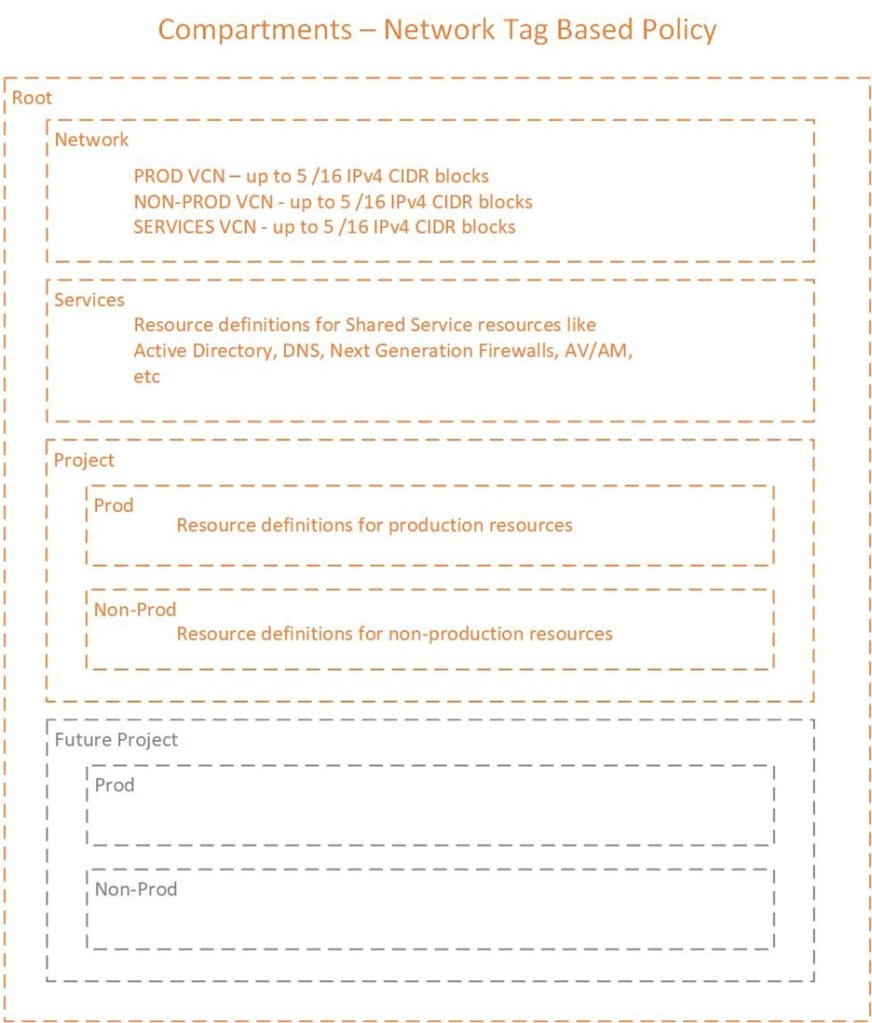
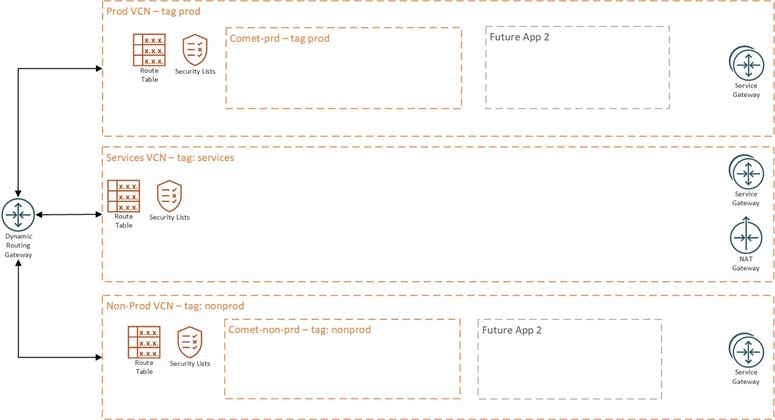
I am using an example of three VCN to be realistic. In my experience, most IT security organizations want to physically see segmentation (in the designs) at the VCN level between production and non-production workloads. While we could simplify this design with a single VCN, the design may be hard to get approval for implementation.
The compartment structure above would allow all VCN to be deployed within the Network compartment. In this example, let’s assume we are deploying a production VCN, non-production VCN and a services VCN.
Readers may be asking, “why not just have a Project compartment? Why break out sub-compartments for Prod and Non-Prod?” Tag-based access is enforced on deployed resources. In order to deploy resources in the compartment, both Prod users and non-Prod users would have to have the same permissions. That defeats the purpose of the segmentation; hence, we segment at the sub-compartment level to ensure Prod resources are managed by the Prod group and non-Prod resources are controlled by the non-Prod group.
The production VCN and subnets would be tagged with a defined tag created in a tag namespace. In this example, we will create a tag called “environment”. The VCN would be deployed with a tag of “prod”. See image below for VCN design.
If you are curious as to how a simplified network design might look, here is an example:
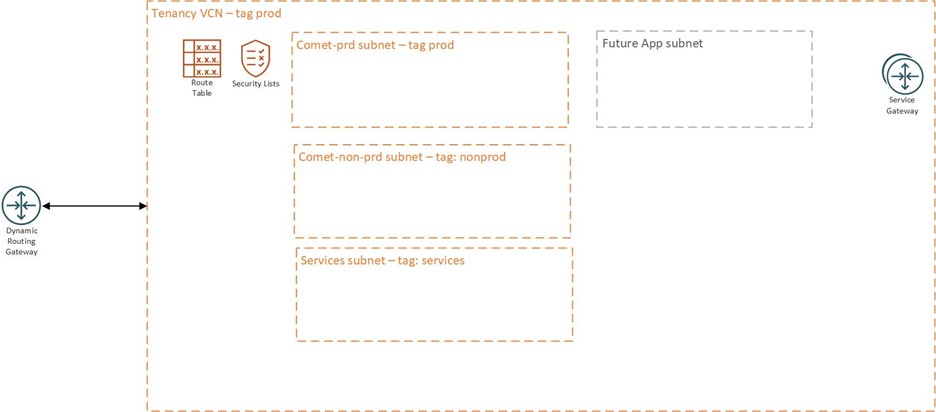
I would like to note that OCI has also introduced intra-VCN routing, which means we no longer have any technical barriers to applying the simplified design. Which means we can now control subnet routing in a VCN, so if we want a next gen firewall to monitor all traffic between subnets, we can do that.
The policies listed below are an example of how to allow the group Prod to deploy a compute resource within the Project sub-compartment Prod within the Prod VCN based on the tag, prod.
Allow group Prod to use virtual-network-family in compartment Network where target.resource.tag.test.environment = ‘prod’
Allow group Prod to read subnets in compartment Network
Allow group Prod to inspect vcns in compartment Network
Allow group Prod to manage instance-family in compartment Project:Prod
Allow group Prod to read all-resources in compartment Network
Allow group Prod to read all-resources in compartment Project:Prod
Allow group Prod to read tag-namespaces in tenancy
Allow group Prod to read app-catalog-listing in tenancy
Allow group Prod to use volume-family in compartment Project:Prod
Allow group Prod to use vnics in compartment Project:Prod
Allow group Prod to use network-security-groups in compartment Network
I could have made that much simpler by allowing the Group Prod, to manage all-resources in compartment Project:Prod, but I wanted to show the possibility to restrict the group to a specific purpose within the compartment (i.e. deploy and manage compute instances).
Hopefully this series has been informative and provided some guidance or ideas around OCI Compartment design. The compartment designs are real world examples of compartment designs that I have implemented over the years. While tag-based policies have been around for some time now, I am seeing more use case for them and adoption. I like the positive effect they have had on the compartment design process as well as network designs. Thanks for taking the time to read through the series!
 Cloud Architecture Blog