Tenancy and the number required is a topic that customers bring up early in the design process. In my experience, customers already have footprints in AWS or Azure. Customers naturally start applying lessons learned or design processes they have from the other cloud service providers (i.e., AWS uses multiple accounts, Azure uses multiple subscriptions).
What was different about OCI was the ability to increase service limits within a tenancy. As an example, if a customer needed more block storage, create the SR and request the service limit increase. If the tenancy can grow and expand to meet the customers needs, then there is not a need for more than one tenancy.
When Oracle introduced Organization Management (ability to link multiple tenancy’s together in a parent/child configuration), I only looked at the offering as a way to manage costs. Organization Management allows customers to either create child tenancy’s or invite existing tenancies to join the parent tenancy. The configuration allows all the tenancies to use the same subscription of the parent tenancy (monthly dollar commitment) and makes it easier to then execute cost analysis or cost reporting across the tenancies.
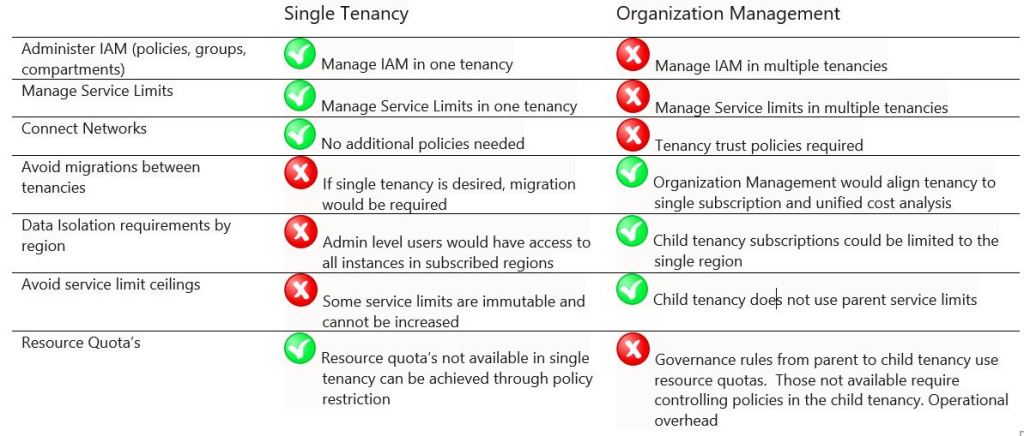
Organization Management made sense for customers that acquired additional OCI tenancies through a merger, as the parent tenancy may have a better pricing discount or by keeping the multiple tenancy approach, eliminates the need for a costly migration. The table below illustrates some of the deltas between single and multiple tenancy operations.
My view on Organization Management has changed since I took responsibility for managing a large global OCI tenancy for multiple development activities. Our development tenancy had strict segmentation requirements that forced the design to implement compartments for each developer, proof-of-concept, or asset creation. The tenancy was designed so that each compartment had its own group and its own policy so that the development teams could manage all the resources in their compartment, as well as add users to their group, while still restricting any user outside of their group access to the compartment.
What I have been learning recently is that there are certain OCI service limits that are immutable. As we discussed in the Compartment Guide series, OCI identity and access management ties groups to policies to control access to compartments. IAM is one of those services with hard limits. Some of the key IAM limits per tenancy are as follows: number of policies (100), statements per policy (50), groups (250) and compartments (1000) *Note: IAM with Identity Domains have the same group, policy, and statements limitations.
When I requested an increase to the number of policies in the tenancy I was denied because an increase to policies could impact the performance SLA for authentication and authorization. The hard limit on policies forced us to start looking for opportunities to streamline the policy statements. One option I have been toying with is using tag-based authorization. We have a set of common policies that apply to all users within the tenancy (i.e., use cloudshell, use a tag namespace, use a common vault, etc.), but for the compartment admin access I could implement the following policies:
allow any-user to manage all-resources in tenancy where all{ target.resource.compartment.tagnamespace.group = request.groups.id, request.permission != ‘COMPARTMENT_UPDATE’}
allow any-user to inspect all-resources in compartment tagtest where target.resource.compartment.tagnamespace.group = request.groups.id
By tagging the compartments with the ocid of the group we create for the compartment, the statement above allows us to control the compartment authorization with just two policies. That is a big reduction from having a policy per compartment. Because I felt it was important that the compartment admins not be able to change the tag on their compartment, I added the request.permission to prevent any changes to the compartment (including tags). We have a request site where developers can request access or request to be added to another group so luckily, I did not have to solve for ability to add users to a compartment admin group.
I was able to fix the issue we were facing for policies, but we still have the limits on users, groups and compartments. The compartment design and required segmentation limit any streamlining of the group design. This is a case where managed organizations with parent and child tenancies becomes a very good fit. If we start dividing the tenancy by region, we can easily manage around the other IAM limits. We can create child tenancies for Europe and another for Asia. The tenancies are under one subscription and we can set some governance rules for the child tenancies.
While I like the idea of the governance rules, it is important to note that the governance rules are created using resource quotas. The quota’s that can be applied are provided by the OCI product teams. So, as an example, the Network product team currently only provides quota’s that can be applied to the number of VCN that can be deployed and the number of reserved public IP addresses. I recently had a customer that wanted to restrict Internet Gateway or NAT Gateway deployment in any child tenancy. That restriction is not possible using governance rules…at least not yet. As those quota’s become available, Organization Management will become a more complete offering that is ideal for managed service offerings, SCCA’s, customers bumping into tenancy hard limits, acquisitions, etc.
I strive to keep the number of tenancies to one as I am not a fan of introducing operational overhead where it is not warranted, but I think I have illustrated use cases where that is not always the right answer. Sometimes there are compelling reasons to have multiple tenancies and Organization Management is a great way to make that happen.
 Cloud Architecture Blog