I was recently asked by a colleague if I would do a post on how to avoid potential issues with route advertisement via OCI’s Dynamic Routing Gateway. I will do my best not to make this post too technical. I have witnessed two occasions where an implementation has advertised a wrong route and caused a network outage (in one case all Azure traffic started routing to OCI and in the other all on-premise traffic began routing to OCI). In both cases, the issue occurred when trying to deploy a third-party firewall to inspect traffic in and out of the tenancy as well as traffic within the tenancy.
I will start by introducing a common use case for using a Next Generation Firewall, which requires transit routing configuration. I just lost half the readers by writing transit routing, but bear with me on this as I will try and explain it in less technical terms.
Transit routing means we need to setup the networking in a way that all traffic coming into and out of the cloud network and traffic inside the cloud network goes through the firewall (to make sure the traffic is secured). For the purpose of this post, I am going to assume the use of the Dynamic Routing Gateway version 2 (DRG). I will have to do a whole other post on comparing DRGv1 and DRGv2. The reason I am assuming DRGv2 is that any new OCI tenancy’s will use DRGv2 by default (applies to more potential readers).
Below is a quick diagram that shows the following:
- Traffic to and from Azure or on-premise to either the Production or Non-Prod VCN’s will first need to pass through the firewall. Represented in the blue lines
- Potential Use cases:
- Access to Prod and Non-Prod systems from on-prem
- Integrating data to Azure for Power BI or maybe an application layer that is in Azure and using a database in OCI
- Potential Use cases:
- Traffic between the Production and Non-Prod VCN’s would also need to go through the firewall. Non-Prod traffic in and out of the firewall in Green and Production traffic in and out of the firewall represented in Red.
- Potential Use Cases:
- Code migration from Non-Prod to Prod
- Database refresh from Production to Non-Production
- Potential Use Cases:

As the flow diagram indicates, the DRG plays a vital role in directing/routing the traffic. OCI has done a great job detailing the steps required to implement a firewall architecture. Check out using a DRG to route traffic through a centralized network virtual appliance.
Using the provided OCI steps as our guide, once we have deployed a virtual cloud network and we have subnets, it is time to set the routes at the subnet level.
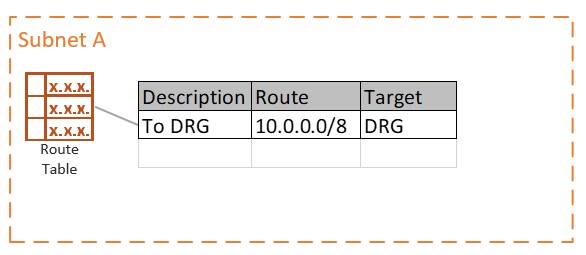
In the route table above, we added a route that would encompass all on-premise (I have assumed on premise is using 10.x.x.x addressing), Azure and any existing or future OCI VCN. Any traffic in the range of 10.0.0.0/8 the next hop on the network will be to the DRG. I see a large number of cloud admins use an all-encompassing route rule so that they will not have to make updates to the route table as VCN are added or new routes are required to Azure or to on-premise. Alternatively, the route table could look something like the following using more defined routes:
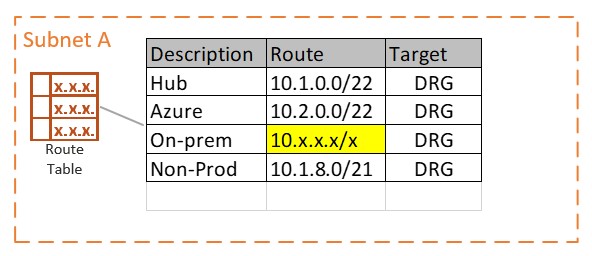
When we start looking at the DRG configuration, I need to introduce a couple of concepts in order to make this more digestible.
- DRG attachments – I will limit these to the two we need for this example
- VCN – that would be our 3 VCN (Services, Prod and Non-Prod)
- Virtual Circuit – in our example they are the Azure and On-premise connections to the DRG
- Static vs Dynamic Routes
- Dynamic – dynamic routes are imported from attachments and inserted into the route table using an import route distribution
- Static – static routes are inserted into the route table by the end user (API, CLI, etc.)
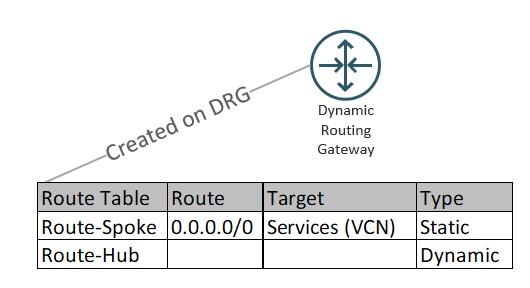
The DRG route table Spoke will be assigned to the Production and Non-Production VCN attachments. It simply ensures that all network traffic coming from those attachments’ routes to the Services VCN (where our firewall resides).
The route table Hub is setup to import ALL of the routes from the virtual circuits and VCN attachments. We apply the Route-Hub table to the VCN attachment of the Services VCN. Now the Services VCN will have a route to send the traffic inspected by the firewall on to the intended destination (virtual circuits for on-prem or Azure, VCN Attachments for traffic needing to go to Production or Non-Production VCN).
We also need to add a VCN route table on the VCN attachment for the Services VCN. This is the step that tells the Services VCN what to do with all that inbound traffic intended for the firewall. This is the part where we can accidentally get ourselves into trouble!
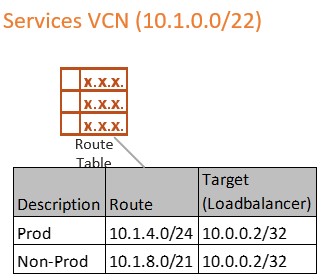
We want to create a separate route table for the inbound traffic being directed to the firewall. In the two cases where I have seen a bad route advertisement, the cloud admin used an existing route table that had an all-encompassing route rule (remember the rule for the subnet that pointed 10.0.0.0/8 to the DRG) as the VCN route table associated to the VCN attachment.
The Virtual Circuits attached to the DRG, by default, get all VCN routes, including VCN attachment private routes. So, if we attached a route table to the Services VCN attachment that has a route rule directing 10.0.0.0/8 to the DRG, the Virtual Circuits (Azure and On-premise) will also get that route rule. Now we have a situation where On-premise and/or Azure just learned an unintended route and would now start sending any network traffic in the 10.0.0.0/8 IP range to the OCI DRG. Network traffic is no longer going where it was supposed to be going (like Azure network traffic to OCI instead of on-premise or all on-premise traffic being routed to the DRG instead of inside the on-premise datacenter).
This was a long-winded blog to get to a couple of rules to live by so that we do not accidentally advertise a bad route and cause ourselves a VERY bad day:
- When setting up transit routing, ALWAYS use a separate route table for the transit VCN attachment (separate meaning not one in use by the subnets)
- Route tables associated with a Virtual Circuit (or IPSEC if using VPN) CANNOT have a catch all route rule or use an import route distribution to import more than the VCN ip addresses (don’t change the default setting).
There is nothing from OCI that will prevent an admin from accidentally adding a bad route to a VCN attachment or inadvertently advertising an OCI private route to a virtual circuit. It is always best practice to lay out the route tables and route rules in the design for implementation so that there is no confusion and less likelihood of mistakes. In the end we wind up with a design like the following:

 Cloud Architecture Blog