VMware migrations to cloud service provider (CSP) VMware services have been a recent focus of mine. There are generally two drivers for migrating VMware to the cloud. 1. A requirement to get out of a data center in a limited timeframe and 2. the acquisition and subsequent change to subscription-based licensing. I am actively working on an Azure VMWare Service (AVS) and a separate OCVS engagement. The purpose of this blog post is not to compare the two offerings but to offer insights into best practices for VMWare migrations to the cloud.
Taking inventory of the existing on-premise VMware environment is the critical first step in the process and surprisingly is the step that is often not given enough focus and time. I want to break this down into a couple of critical area’s:
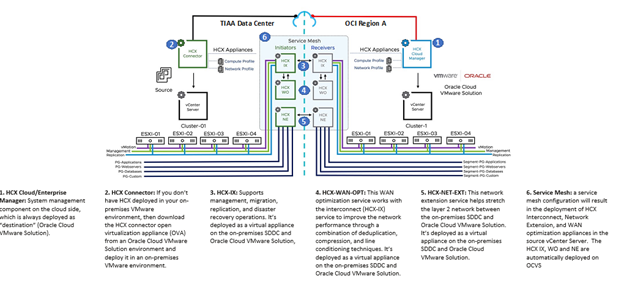
- Network Planning – Extend or not? The choice comes down to hot or cold migrations. If hot migration, whether that is a live migration or a bulk migration, is required then we need to look at the HCX layer 2 network extension. While the HCX license is included, the up-front leg work of mapping the on-premises vlan’s and the traffic between those vlan’s is not.
If everything in a vlan is migrating, then HCX network extension is easy to use and tear down once the VM’s have migrated. In my experience, my customers have a mix of workloads or even physical servers within the vlan, which means there is work to be done to clean up the vlan prior to migrating to the cloud solution. The network extension cannot be removed until the vlan on-premise is empty. There is no technical reason that the network extension cannot just stay in-place, but it is frowned upon by IT security and is added burden on the operations team.
In the past we have used the virtual network assessment, but I can’t seem to find it on VMWare’s site post-acquisition.
- Storage requirements and backups – It is important to understand how the storage is being presented to the VM instances. As an example, I have seen Oracle databases with direct mapped iSCSI devices or SQL Server clusters using Windows Server Failover Cluster which requires a shared storage solution.
While I would recommend moving those database instances to Database as a service or to cloud native VM’s, sometimes project timelines or the impact of changes to operational support require us to move forward with a lift and shift approach. In those cases, those storage requirements will drive choices of the ESXi hosts. As an example, if I have a requirement to use vSAN for the shared storage (faster performing shared storage), I need to choose a DenseIO shape on OCVS versus the Standard shape. If I do not require vSAN, then I can look to use OCI file storage service (FSS). Where we have requirements for presenting devices as iSCSI, on OCVS we will need to do a raw device mapping to the block storage. The disadvantage there is that the live migration options are now off the table for the migration of those VM’s….which leads us into backups and recovery.
The backup solution for VMware in the cloud needs to be considered when putting together the bill of material. AVS can be integrated with an Azure Backup Server but we generally tend to see customers bringing their own backup solutions with the migration. Backup utilities like Commvault or Data Domain Virtual Edition. Customers need to plan for the number of backups and the retention of the backups. Ideally, the backup solution will be able to utilize object storage as the media library but if not, then block storage will need to be accounted for in the solution.
- Cloud Sizing – On both the AVS and OCVS solutions, customers can choose the Host type for the solutions. AVS being a managed solution where Azure installs and manages VMware for the customer, narrows the scope of choice to the amount of CPU, Memory and Storage required.
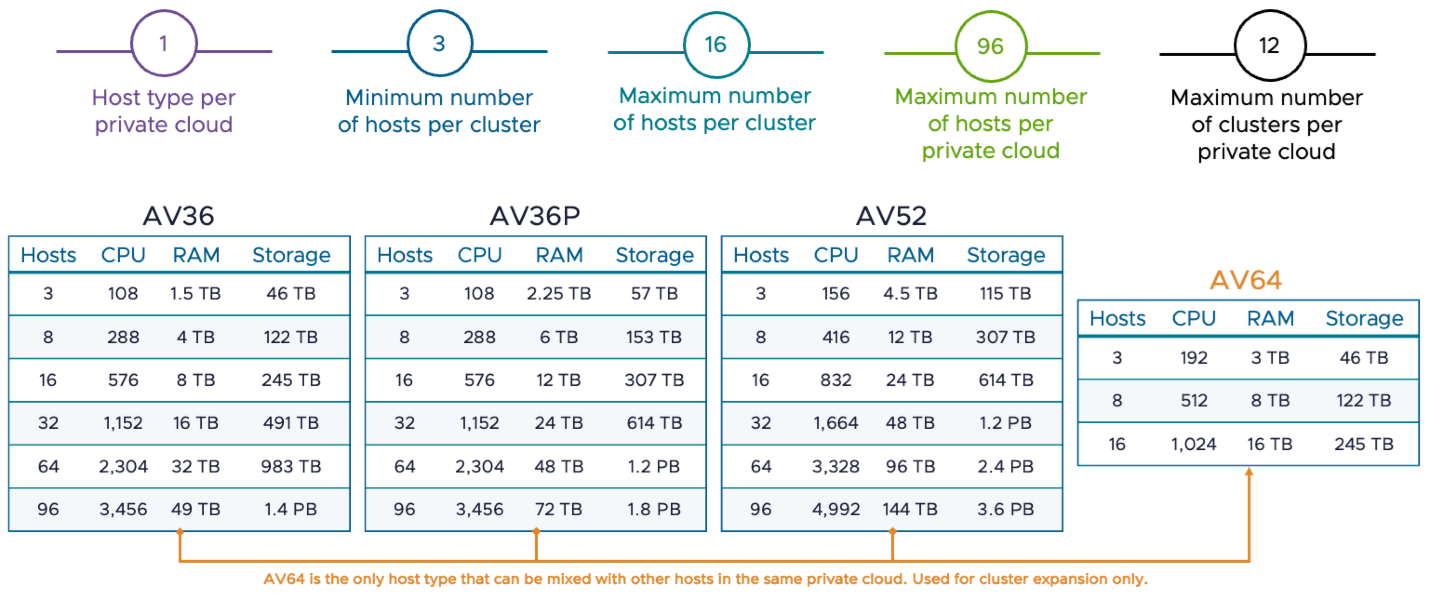
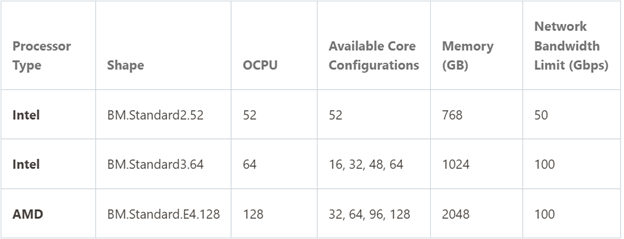
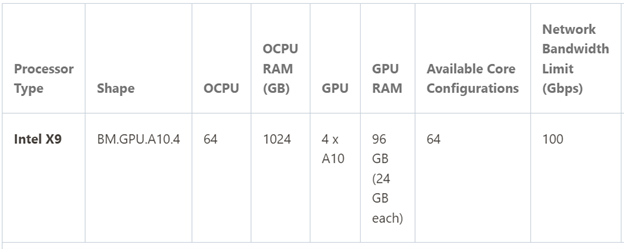
In OCVS, there is a Wizard to configure the deployment of VMware for the customer, but the customer can choose between AMD or Intel host types as well as Standard (no internal nvme storage) or DenseIO shapes (included nvme shapes. If a customer chooses AMD because of capacity and cost, then they need to consider any conversion from Intel on-prem to AMD in the cloud which could impact migration options. OCVS also offers a GPU host type. The host type options for OCVS are below:
The VMware service on a CSP should not be the long term run strategy for any customer. The service is there to provide customers time, with a locked in VMware cost/rate, to move off to cloud native services. In some cases, that borrowed time allows customers the time needed to modernize applications if they are not yet ready to take advantage of cloud native services. Proper planning is going to improve the migration experience and with the proper landing zone (number of clusters, hosts per cluster, storage, backups, etc.), little change to the existing operating procedure so that the next area focus is on the migration to cloud native rather than stabilizing your VMware in the cloud.
 Cloud Architecture Blog