With our OKE cluster successfully deployed, it was time to start working on the GPU node deployment. Our GPU node/s have a requirement to run Ubuntu 22.04 because of the support for the NVIDIA GPU Operators that are required by the run:ai scheduler.
For optimal performance between the GPU worker node instances, we needed to configure them using the OCI cluster network. OCI uses Remote Direct Memory Access (RDMA) over converged ethernet (RoCE) to ensure that the GPU nodes deployed are connected with a high-bandwidth, ultra low-latency network. Each node in the cluster is a bare metal machine located in close physical proximity to the other nodes. The RoCE network between nodes provides latency as low as single-digit microseconds, comparable to on-premises HPC clusters.
Because we needed the GPU worker node to run Ubuntu and not Oracle Linux we had to setup our Cluster Network and Instance Pool using the CLI. As noted from the previous blog entries, we had decided to use the OCI VCN Native Pod Networking. Under the CLI section of the creating self-managed nodes documentation, there is a very important clarification:
If you want the self-managed node to use the OCI VCN-Native Pod Networking CNI plugin for pod networking, add the –metadata parameter to the oci compute instance launch command, as follows:
–metadata ‘{“oke-native-pod-networking”: “true”, “oke-max-pods”: “<max-pods-per-node>”, “pod-subnets”: “<pod-subnet-ocid>”, “pod-nsgids”: “<nsg-ocid>”}’
We learned this one the hard way as our node would join the cluster but would never enter a ready state. We could not proceed with scheduler installation until we applied the fix.
Run:ai also wants the GPU Monitoring disabled. Your plug-in section would look similar to the following:
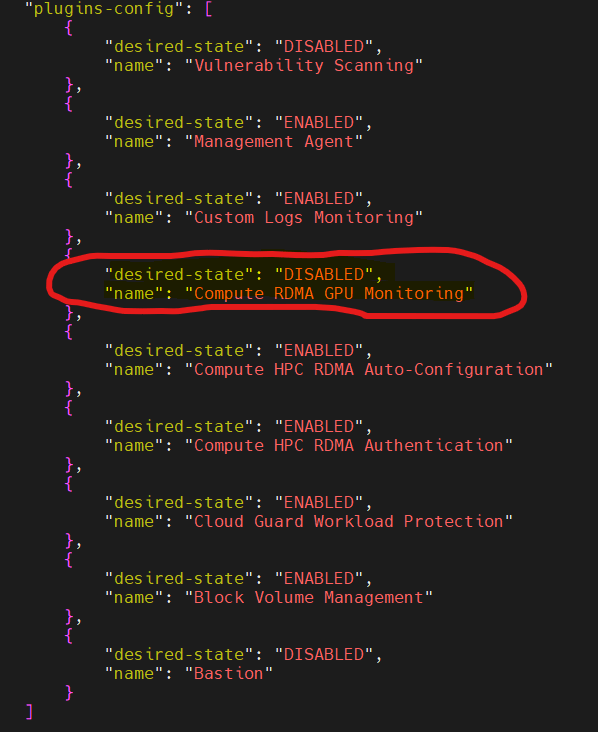
Run:ai is very particular about the GPU operators as they need them installed using helm. OCI tries to be helpful by providing GPU monitoring but the agent monitoring does not play well with the run:ai cluster software.
Once we had run:ai installed, we encountered an issue seeing the GPU’s in the run:ai console. The issue turned out to be that our OKE node pool was deployed running Oracle Linux (as users can only choose Oracle Linux when deploying from the OCI console). The Oracle Linux managed node pool was bootstrapping the worker nodes with the nvidia developer toolkit. The toolkit was causing a conflict with the gpu operator. The only way to resolve this was to stand-up a new managed node pool running a clean Ubuntu OS image.
OCI and run:ai are working on support for Oracle Linux, but until that support is in place, any run:ai customers on OCI will need to create the managed node pool for OKE with a base image (not an OCI provided image) of Ubuntu 22.04 or 24.04.
While we did not have to destroy and re-create the cluster, we did have to create a new node pool for the cluster and remove the Oracle Linux managed nodes. This was all done via cli as we had to pass user data parameters. Up next, figuring out how to configure run:ai to use RDMA.
 Cloud Architecture Blog