In the last blog entry, we left off with the scheduler and Kubernetes cluster decision in place. Our focus quickly turned to storage options. Since we will have two GPU worker nodes we required a shared storage option. The throughput objective requirement that was provided was 50 Gbps.
OCI AI Architecture documentation lists Lustre, BeeGFS, GlusterFS and WEKA as other potential options. One that was not on the list but came recommended by the team I am working with is VAST. I was also on the hunt for an OCI cloud native option. As it turns out, OCI has a great option in the OCI File Storage Service (FSS) High Performance Mount Targets (HPMT).
My research into the options lead to direct discussions with VAST, Lustre and the OCI FSS storage team. Each option had its merits.
- VAST
- Provided workflow capabilities for the RAG portion of the architecture
- Ability to integrate with other VAST storage clusters without the need for large data transfers (i.e. run AI workloads across other CSP or on-prem location)
- Great option for enterprise solutions that are approaching petabytes of required storage or very large models that may be doing multi-terabyte checkpoints. In this case, it would be an expensive solution and could be difficult to scale down (when we no longer required large amounts of data).
- We were looking at using Bare Metal shapes with local nvme storage to stripe filesystems across for maximum throughput
- Designed for no single point of failure
- Lustre
- Very similar to the VAST solution in that it is designed for large amounts of data and very large AI modeling checkpoints
- Like the VAST solution we were looking at using Bare Metal shapes with local nvme storage to stripe filesystems across for maximum throughput
- Designed for no single point of failure
- OCI is working on a high-performance mount option with Lustre but it is not available yet. Definitely going to be keeping my eye on this planned feature release!
- Very similar to the VAST solution in that it is designed for large amounts of data and very large AI modeling checkpoints
- FSS HPMT
- Ability to scale to 20, 40 and 80Gbps mount targets
- When scaled to HPMT they are a minimum of a 30-day billing commitment
- Ability to scale down when higher throughput is no longer required…which helped our initiative to optimize cost!
- No single point of failure
- GPU Node Scratch Storage
- The worker nodes are Bare Metal instances with 16 x 3.84TB local nvme drives (roughly 61TB of internal storage)
- If we were only running one node, this is a viable option for the storage
- When running 2 or more nodes, we would have to use nfs to share the storage to the other nodes and that creates a single point of failure should the sharing node become unavailable
Maybe someday in the future I will work on an AI architecture that requires Petabytes of storage. For this initiative, the FSS HPMT option was the most cost-effective. It provided an option that exceeded the storage throughput requirements of 50Gbps. We planned on running more than one GPU worker node so we eliminated the GPU scratch storage option.
As a side note, pay close attention when deploying your OKE cluster. We did not use automation for this first deployment and we inadvertently deployed our OKE cluster in one compartment and the node pool in a different compartment. Our mistake occurred when we were adding a load balancer to the deployment and we did not notice the change in compartments. This caused us an issue when we were doing sanity checks on block volumes. I would like to get OCI to add a safeguard or some type of warning as we ultimately wound up destroying our cluster and re-creating.
Once the cluster deployment and node pool were re-deployed our pv and pvc sanity checks worked like a charm. The native oci-bv and deprecated oci storage classes performed excellently. They successfully added block volumes to the worker nodes with iscsi attachments. One of the benefits of running OKE vs RKE2 is that OKE comes with the oci-bv container storage interface (CSI) for block volumes. We had to add the fss.csi.oraclecloud.com csi for FSS. Example manifest below:
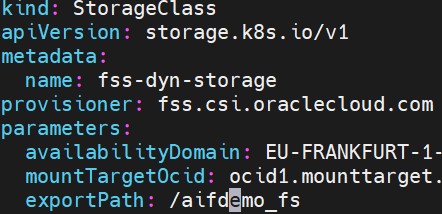
For the FSS provisioning, we followed the OCI instructions. Since this was our first use of the HPMT, we decided to create the mount target manually and add it to the cluster. Up next, we will dive into the network design.
 Cloud Architecture Blog