Now that the infrastructure has been deployed (software defined network, OKE, H100, storage, etc) it was now time to configure the scheduler (run:ai). The first question posed, post installation, “do we need any special configuration for the network operator in order for the scheduler pods to leverage RDMA?” Would we need Single Root I/O Virtualization (SR-IOV)?
What is SR-IOV? SR-IOV enables multiple virtual machines (VMs) to share a single physical PCIe device, like the host channel adapter’s on the H100 GPU nodes. It does so while maintaining near-native performance and security. The physical devices appear as multiple virtual devices (VFs) to the VMs, bypassing the need for emulation overhead.
The answer to the SR-IOV question was…no. The reason is because of Oracle Cloud Infrastructure’s (OCI) “off-box” virtualization. What is “off-box” virtualization you ask? OCI was the the first major cloud to implement “off-box” or isolated network virtualization, which takes network and I/O virtualization out of the server stack and compute hypervisor and puts it in the network. As a result, customers can provision dedicated hosts with no hypervisor overhead, noisy neighbors, or shared resources.
Because the H100 GPU worker nodes are deployed as Bare Metal compute instances, SR-IOV is not needed. The H100 nodes are capable of using RDMA on the Cluster Network by default. In order for the run:ai pods to properly use the GPU’s and RDMA, the pod specs had to be updated.
Pod specifications dictate resource allocation, networking, and other settings for individual pods. The specs can define CPU and memory requests/limits, storage, network configurations, and other aspects of a pod’s behavior. We are currently working with NVIDIA and OCI to finalize the pod specs so that we can proceed with our benchmark testing.
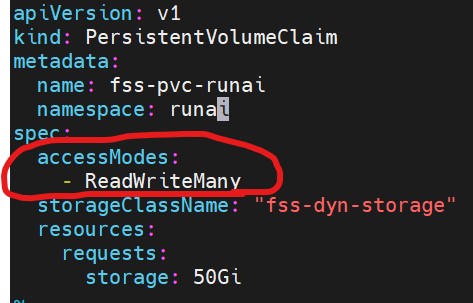
The file storage service (FSS) storage had to be defined within run:ai as well. As you may recall from the storage blog entry, the H100 GPU nodes required a shared storage solution for training check-points and as a repository for the training data. We first created the fss storage class yaml (image included in the storage blog entry of this journey). Below is an image of the persistent volume claim of the fss storage (note the accessModes):
Once we finalize our pod specs for run:ai we will be able to change the number of nodes in our Cluster Networks Instance Pool to automatically spin up a second H100. We will then turn up our throughput on the FSS High Performance Mount. At that point, we will begin our benchmarks.
Once we have completed our benchmarks, I would love to compare the OCI data science service to the run:ai installation. The OCI data science service offers access to the same developer tools and frameworks such as JupyterLab notebooks, PyTorch and TensorFlow. It does lack the same fine grained GPU controls of run:ai (i.e. scheduling fractional GPU’s). I was told that OCI is working on fractional GPU scheduling in a recent training session. I don’t know that the OCI offering will ever match the run:ai scheduling capabilities but I am curious to see how they compare. The main difference I currently see between the run:ai solution and the OCI data science service is that the data science service offers GPU capacity on demand (pay-as-you-go) where the run:ai solution requires customer dedicated GPU instances (A10’s, A100, H100, etc). I would believe that the customer use cases would be a driving factor in deciding between the two offerings.
My AI adventures will continue, but this post wraps up the start of my adventure with AI Architectures on OCI. I hope they are of help to others beginning their AI adventures. Feel free to leave a comment if anyone wants to keep the discussion going!
 Cloud Architecture Blog